 Docs
DocsTelegram
Have a Telegram bot of your own send Rclone UI's notifications to a chat, a group or a channel.
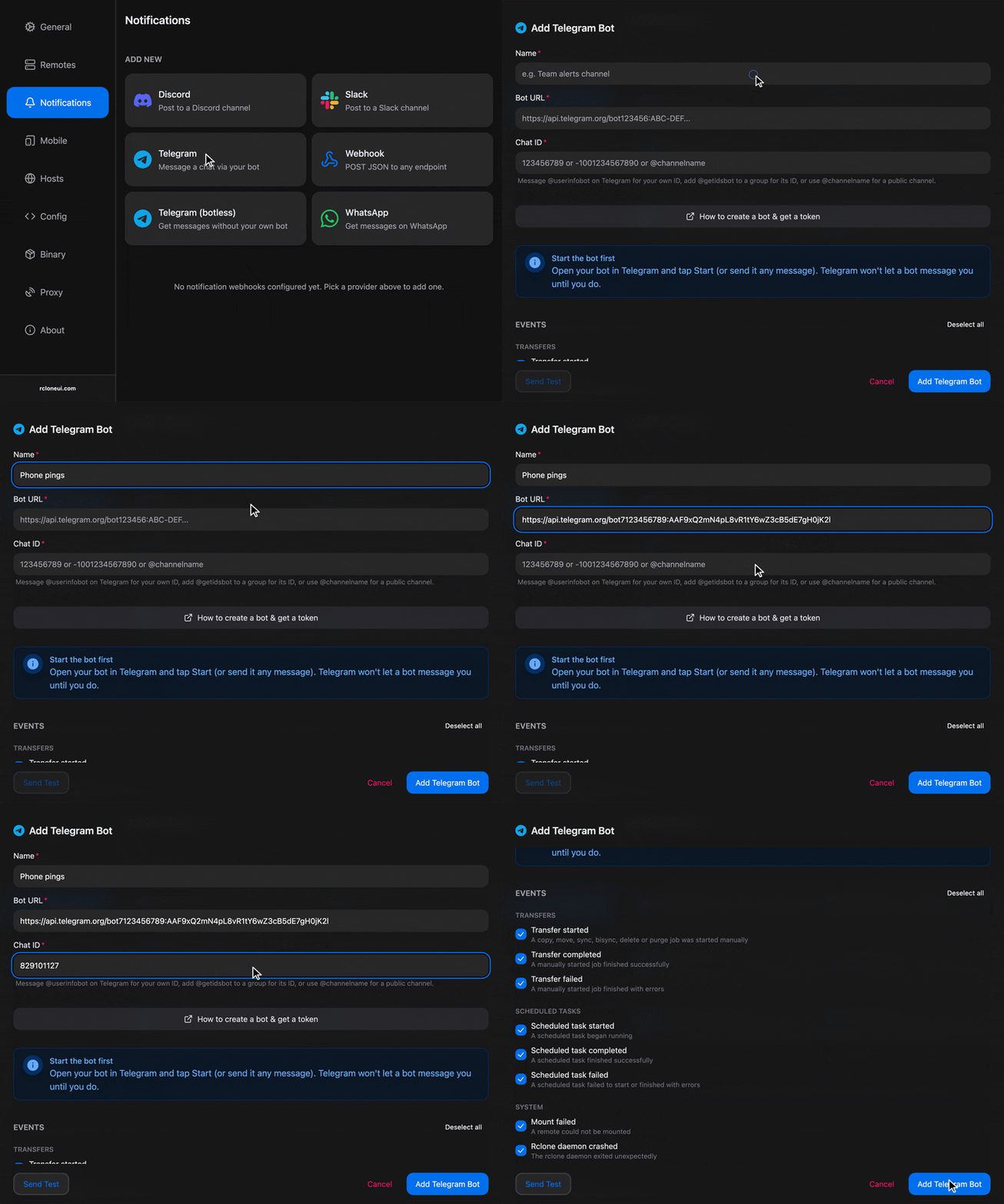
Telegram delivers Rclone UI's messages through a bot of your own, posting to your chat with it, a group, or a channel.
To create a bot and use it for notifications, check out steps outlined below.
Setup
Create the bot
In Telegram, message BotFather, create a bot and copy the token it gives you. The token is what lets Rclone UI send as that bot, so keep it to yourself.
Start the bot
Open the new bot's chat and press Start. A bot cannot message you until you have started it, and a test sent before that fails.
Find the chat ID
For your own chat, message @userinfobot and use it to get your ID. For a group, add the bot to the group, then add @getidsbot to it, which posts the group's ID, a negative number. For a public channel, the channel's name works, written with its @ in front, as long as the bot is an administrator of the channel.
Add the target
In Rclone UI, open the toolbar, type settings and open the Notifications section. Under "Add New", pick Telegram and give it a name.
"Bot URL" is the Telegram Bot API address followed by your token. The field shows the expected shape and a token pasted on its own is refused. "Chat ID" is the ID or channel name from the previous step.
Choose the events
Tick the events this target should receive. To see all the supported events, check the Events section.
Test and save
Press "Send Test". The bot sends its first message to the chat. Then "Add". Rclone UI stores the bot URL and the chat ID together as one address, which is what the target card shows, masked.
Troubleshooting
- "Send Test" fails with an error from Telegram about the chat: the bot was never started from that chat, or the chat ID belongs to another chat. Press Start in the bot's chat and check the ID with the bots named above.
- The test fails for a group or channel: the bot is not a member of the group, or not an administrator of the channel. Add it, then test again.
- "Send Test" is refused with "This doesn't look like a Telegram Bot API URL": "Bot URL" holds the bare token or something else. It has to be the API address with the token appended, as the field's placeholder shows.
- Messages stop and the card shows "Last delivery failed": the token was revoked in BotFather, or the bot was removed from the group. Create a new token or add the bot again, and update the target with "Edit".
How is this guide?